Coco
CashThe notes and coins in your wallet, including travel cash in other currencies.
Log cash, UPI and card spends in two taps. No bank linking, no SMS reading.

No bank login to hand over, no spreadsheet to build, no account to make.
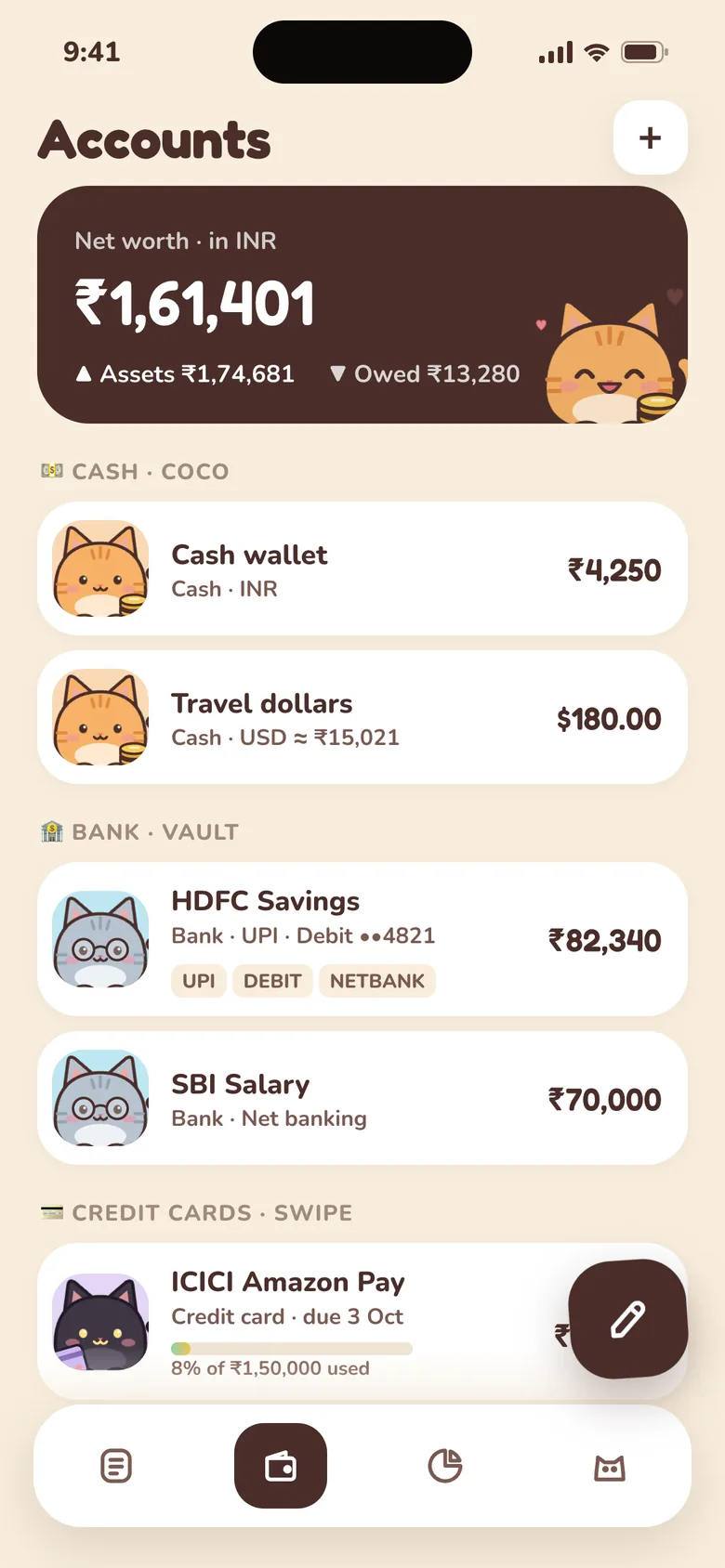
Cash, bank accounts with UPI, credit cards and wallets like Paytm. Each one gets its own cat.
Amount, category, done. On Android you can log from the home-screen widget without opening the app.
A chart of this month by category, budgets that warn you at 80%, and an optional evening reminder so you don't forget.
No cash leaves your hand, so nothing feels like spending. Then the month ends early and your statement is a wall of ₹50s.
Salary lands on the 1st. Three weeks later it's thin, and you honestly can't say where it went.
Chai, an auto, a delivery fee. ₹40 here and ₹120 there never feels like much, until it adds up to thousands.
Auto-trackers want every bank message on your phone. That's a lot to hand over for a pie chart.
The spreadsheet gets abandoned. The app feels like homework. Miss two days and it's easier never to open it again.
Purrse is built for exactly this: quick to log, kind when you miss a day, and nobody reads your messages.
Cash, bank, cards, wallets and money lent to friends are tracked separately, each with its own cat, so you always see what's in each and which one paid.
The notes and coins in your wallet, including travel cash in other currencies.
Your savings or salary account. Mark each spend as UPI, debit card, net banking or cheque.
What you owe on each card, its limit, and when the bill is due.
Paytm, Amazon Pay, PhonePe and other wallets, each with its own balance and top-ups.
Money you lent a friend or borrowed. See who owes whom, and mark it settled when it's paid back.
No spreadsheets, no bank passwords, no guilt. Just a quick, cosy record of where your money went, and a few cats to keep you at it.
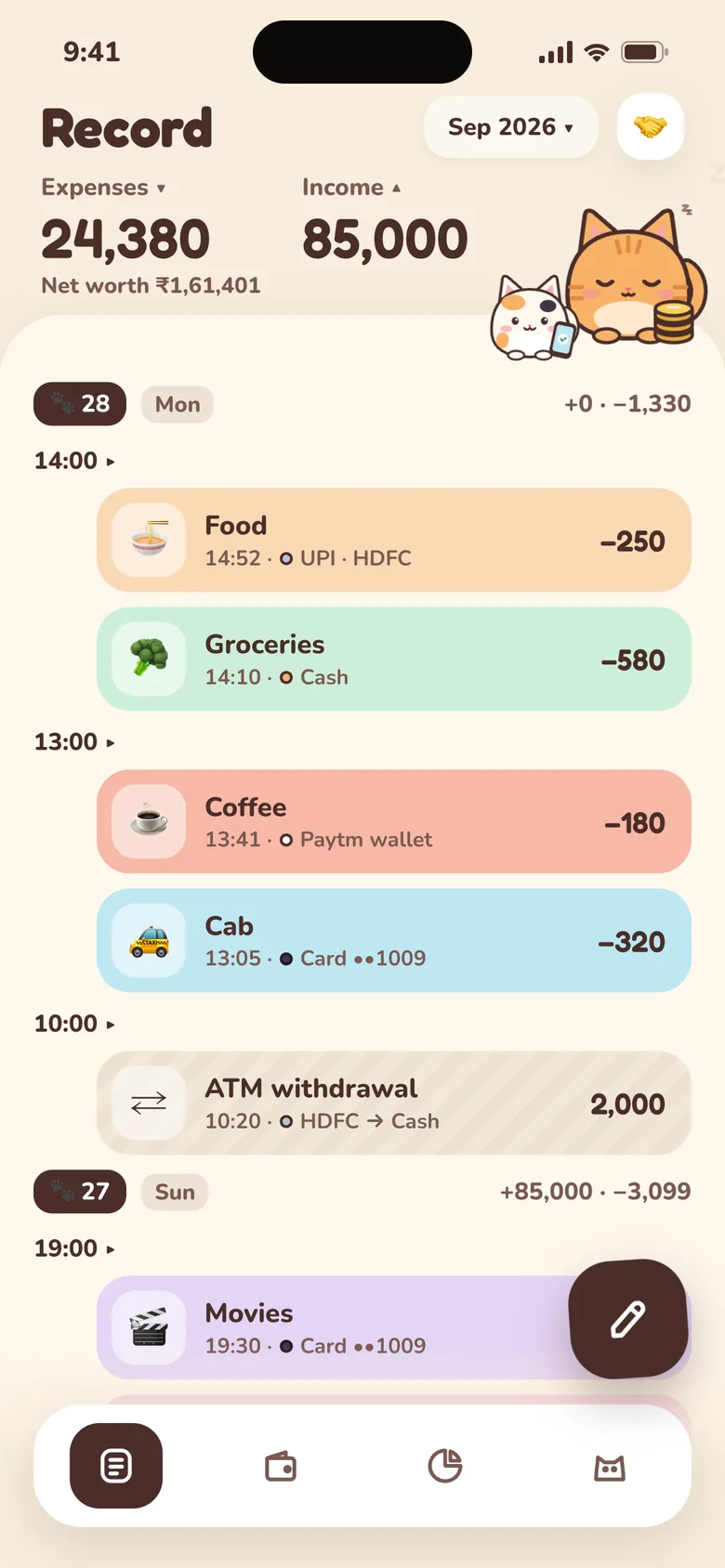
Every spend sits on a timeline by day and hour, coloured by category, with the account and how you paid. Scroll back, and “where did ₹2,000 go?” answers itself.
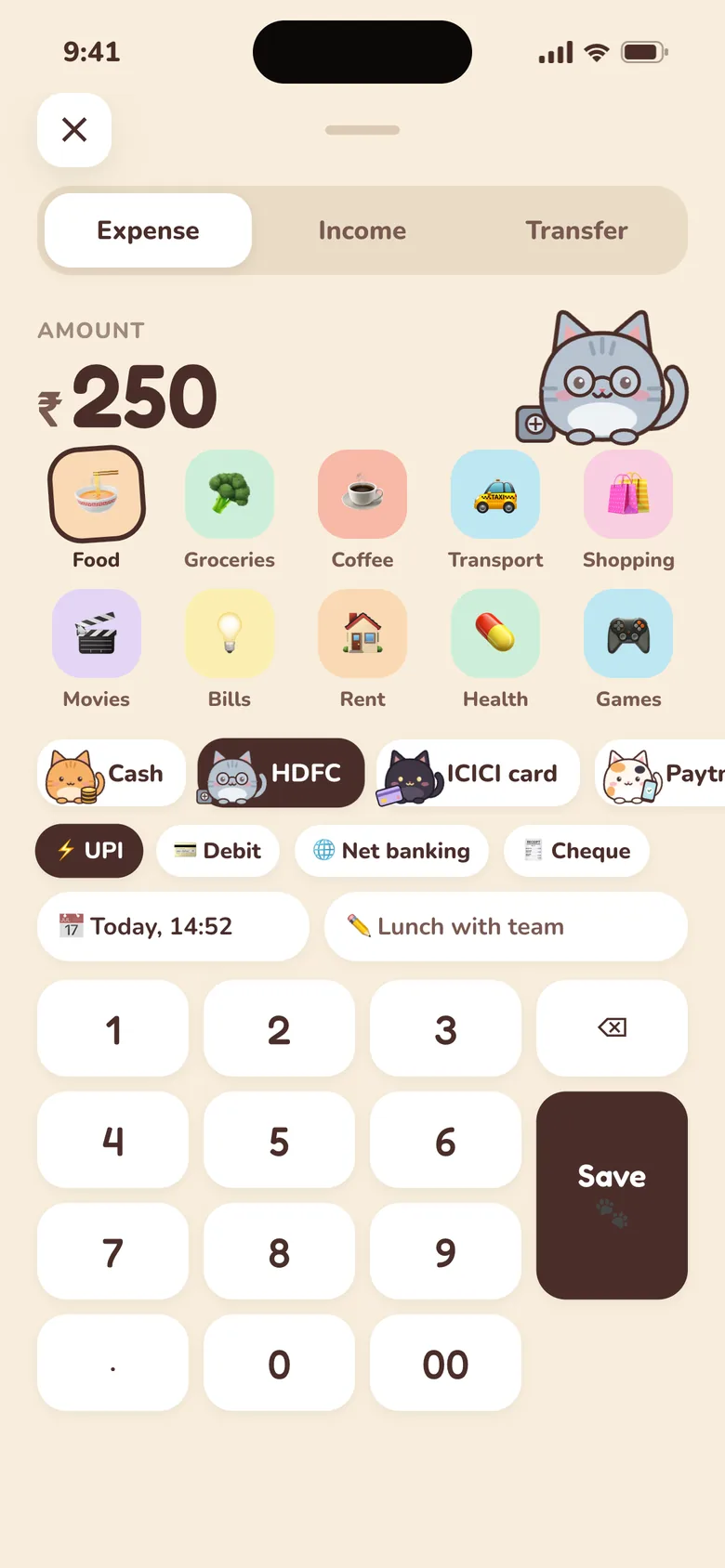
Type the amount, tap a category, done. Purrse remembers the account and method you usually use, so the next one is quicker still.
Just paid? Tap the Purrse widget on your home screen and a small card pops up over whatever you were doing. Amount, account, category, done, without opening the app. Small enough to become a habit.
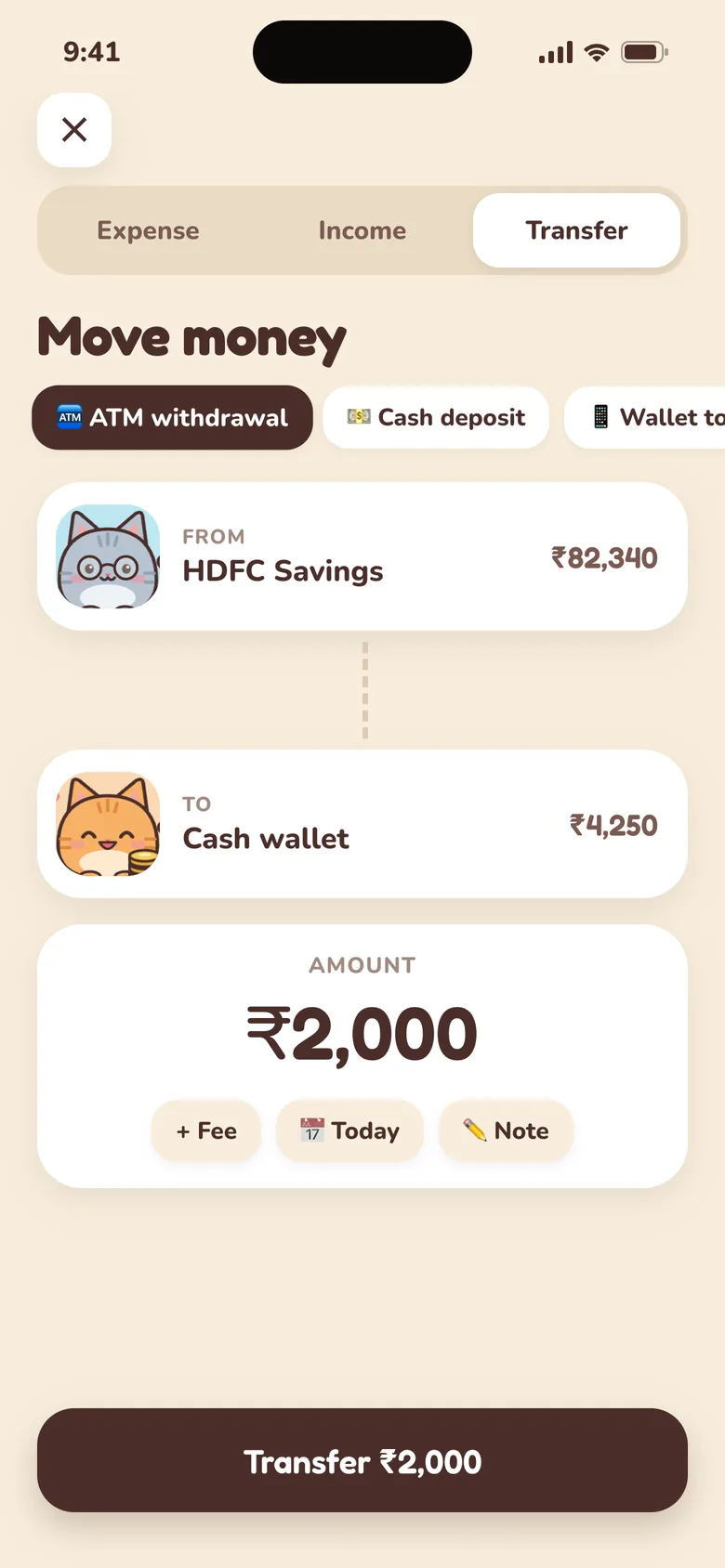
An ATM withdrawal isn't spending. The samosas you buy with that cash are. Withdrawals, top-ups and card bills just move money between your cats, so nothing is counted twice and your totals stay honest.
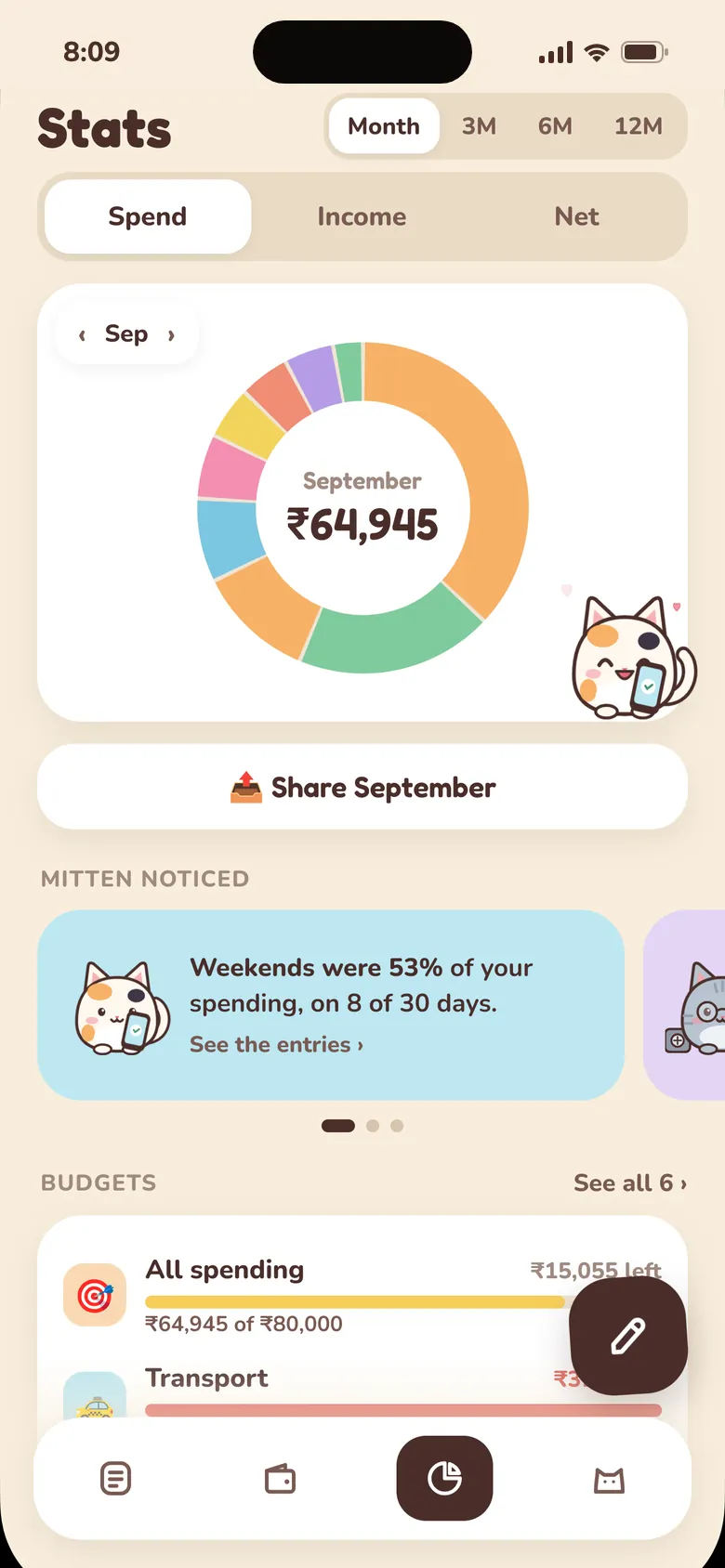
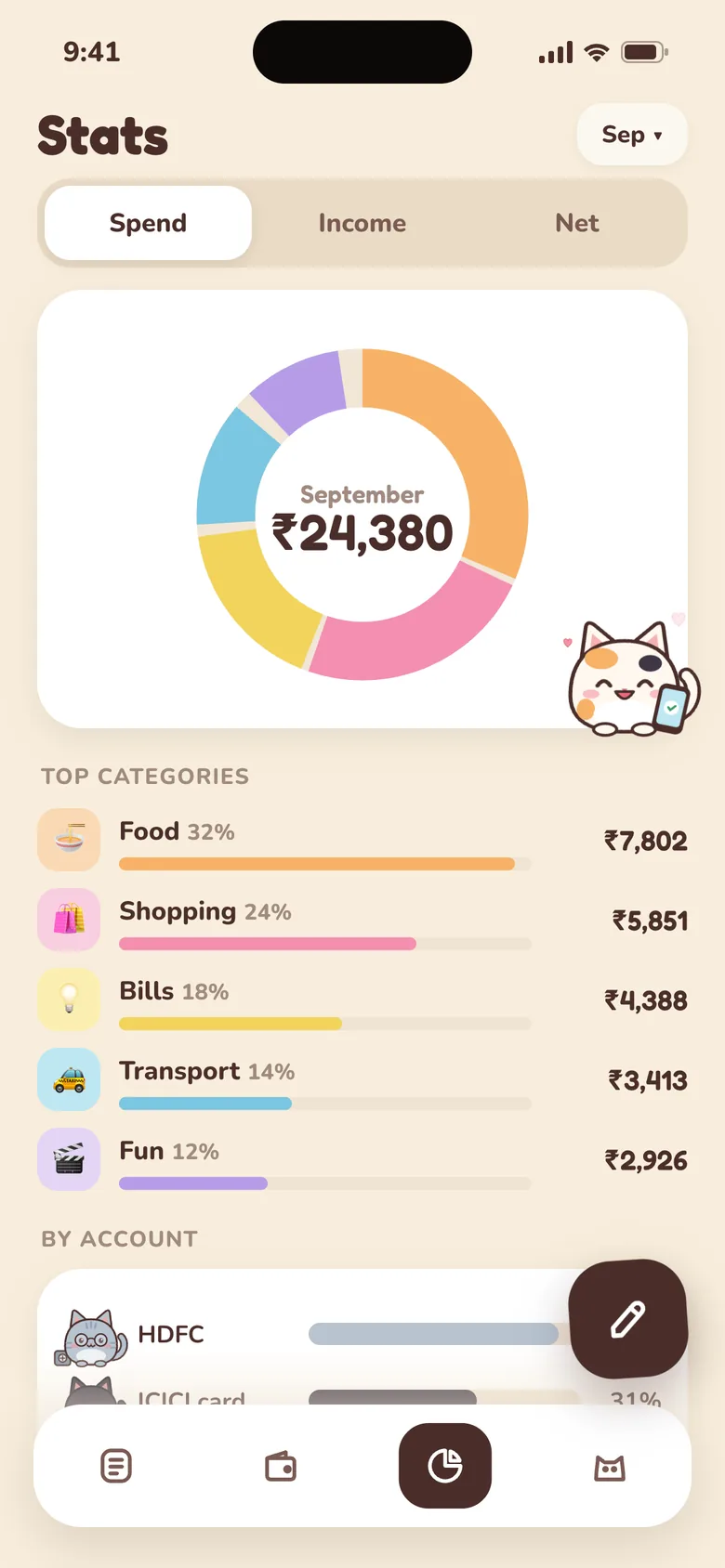
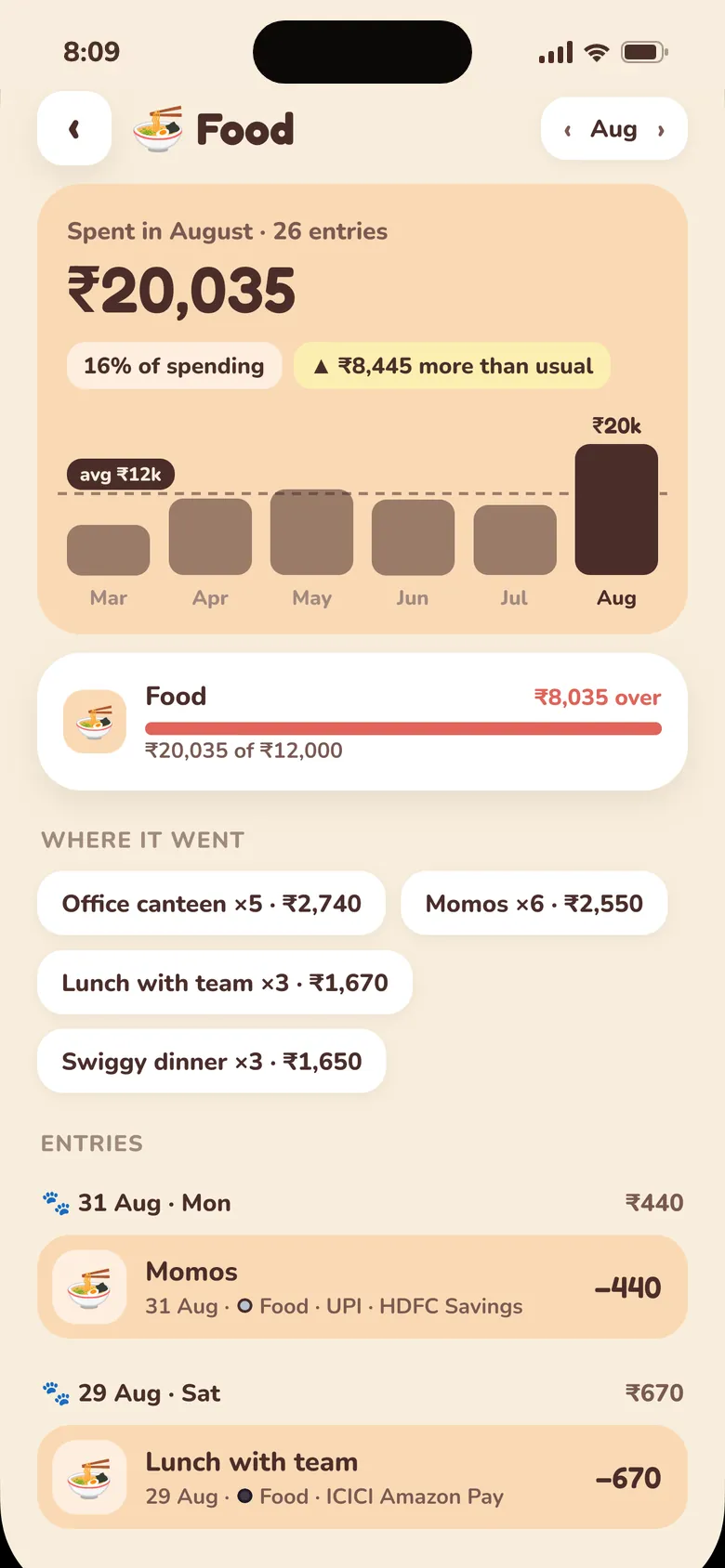
One look at the month: a donut of where it went, your top categories and which account paid. Tap any category to see every entry behind it, and how this month compares with your usual.
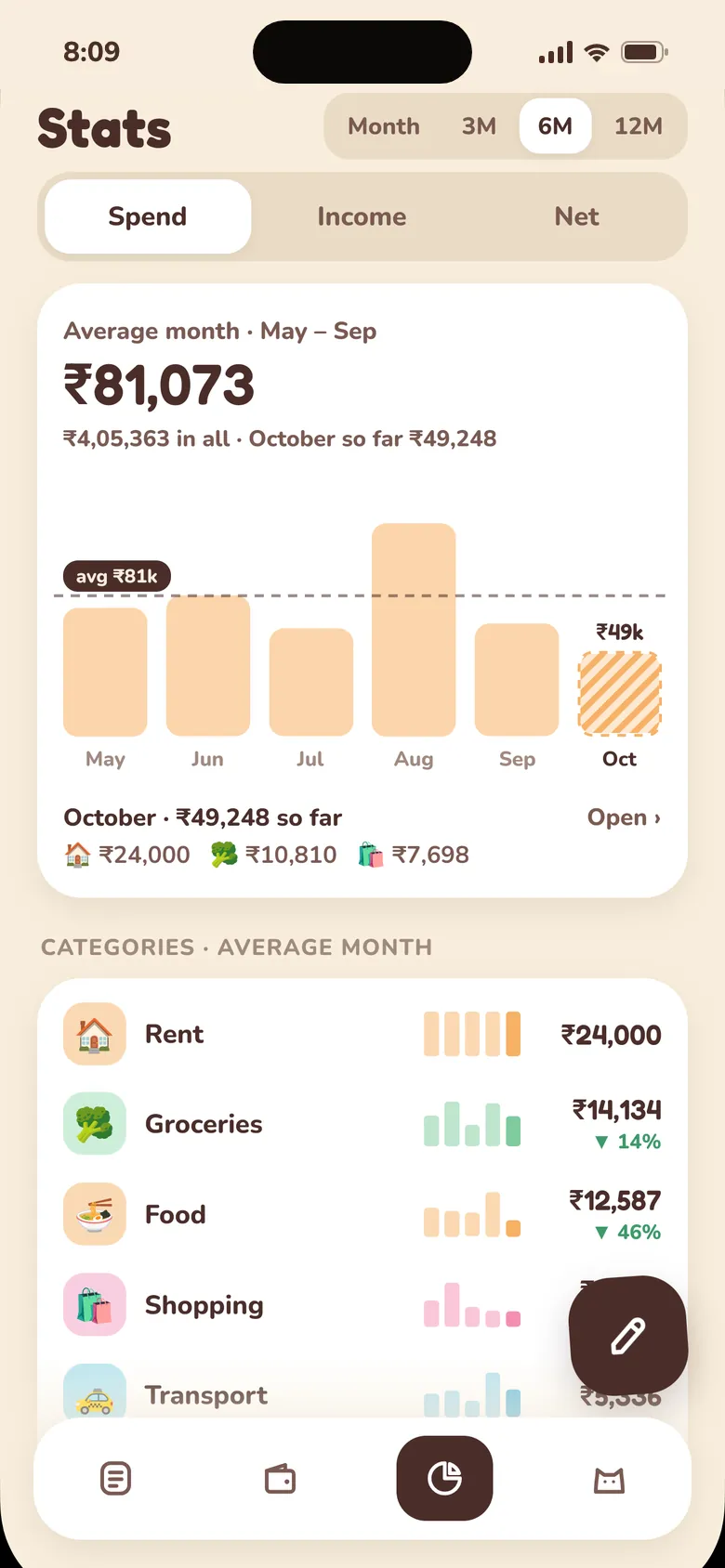
With Purrse Plus, the paid upgrade, switch Stats to 3, 6 or 12 months to see your average month, which categories are creeping up, and how much you kept.
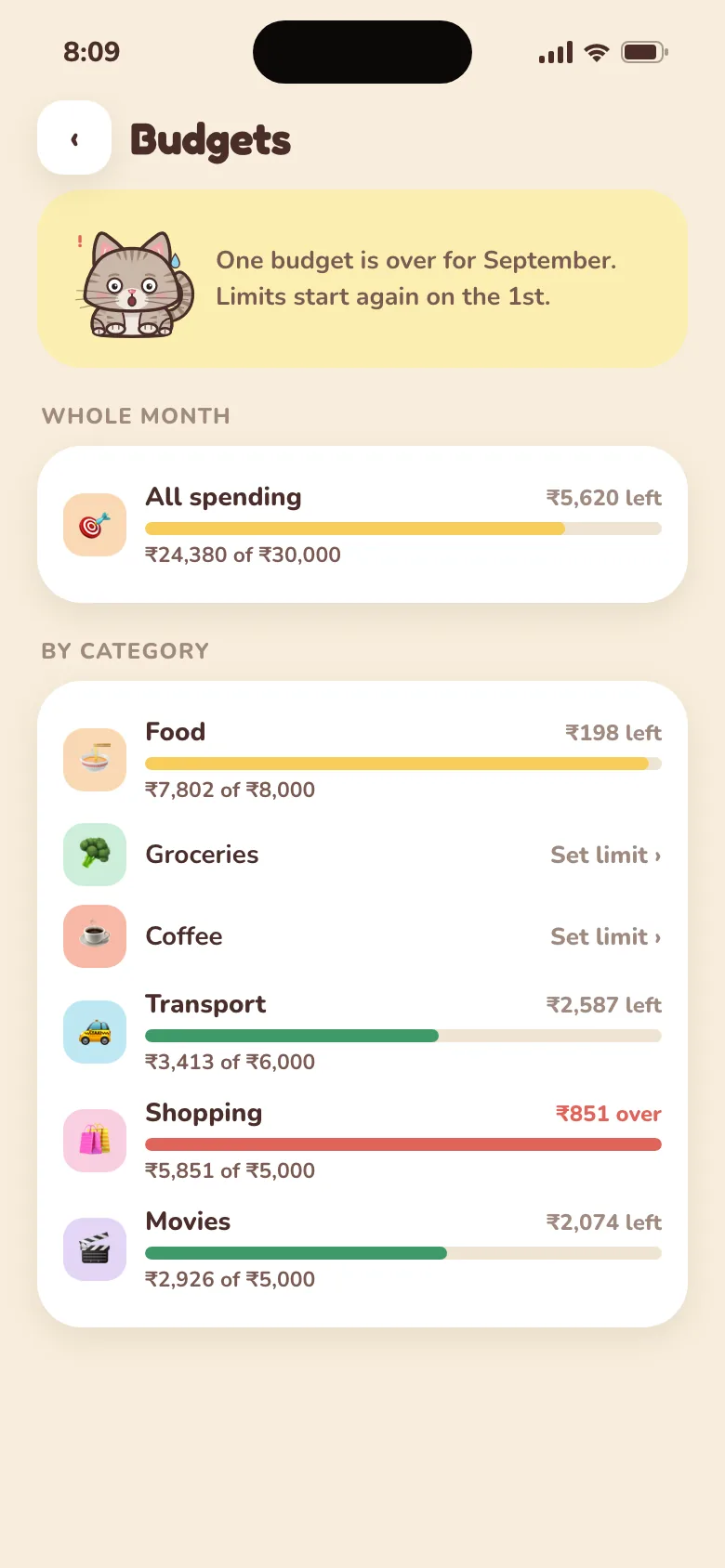
Set a monthly limit for food, shopping, or everything. Purrse shows what's left, and a cat warns you at 80%, while you can still slow down.
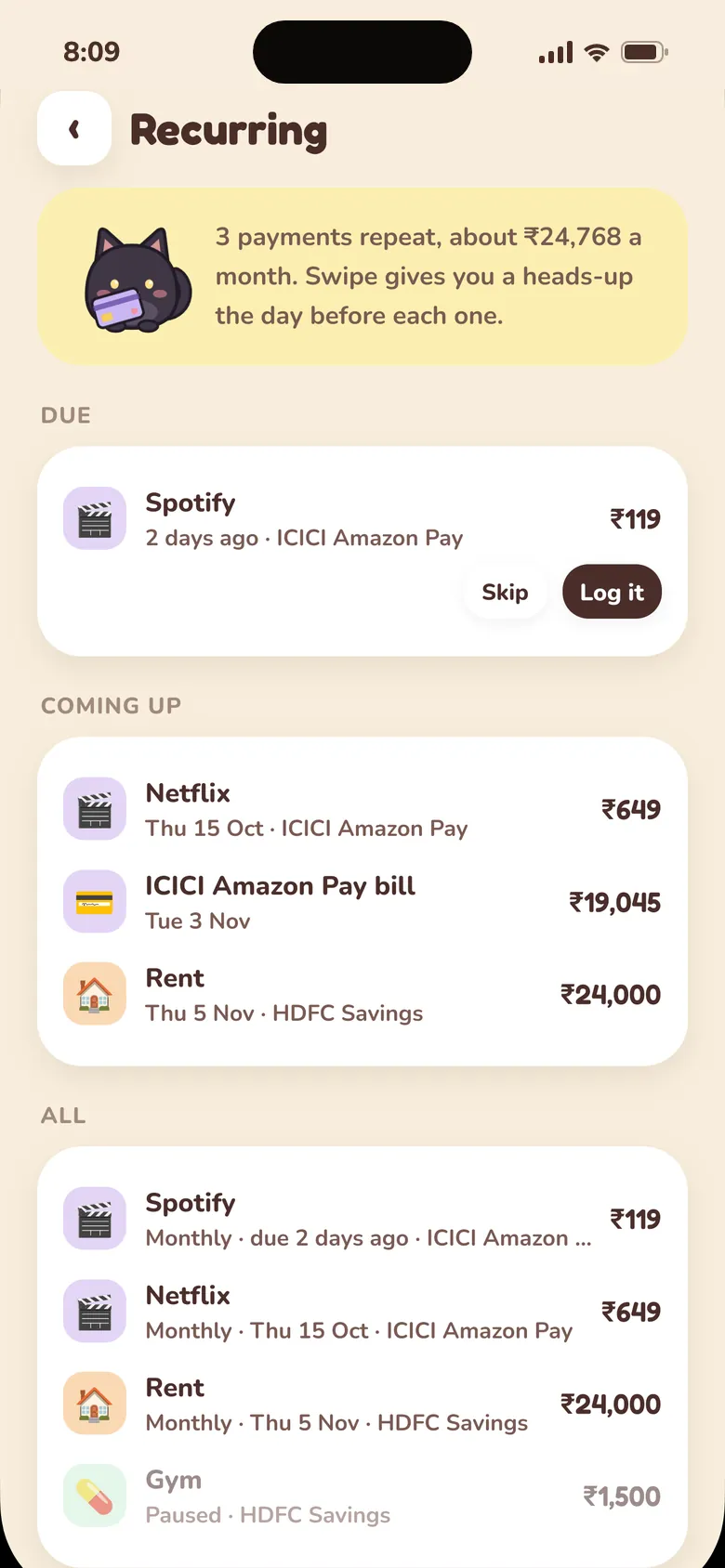
Add rent, an EMI, a SIP or a subscription once. When it's due, a card on the main screen asks: log it or skip it. You see what's coming before it lands, and nothing is logged behind your back.
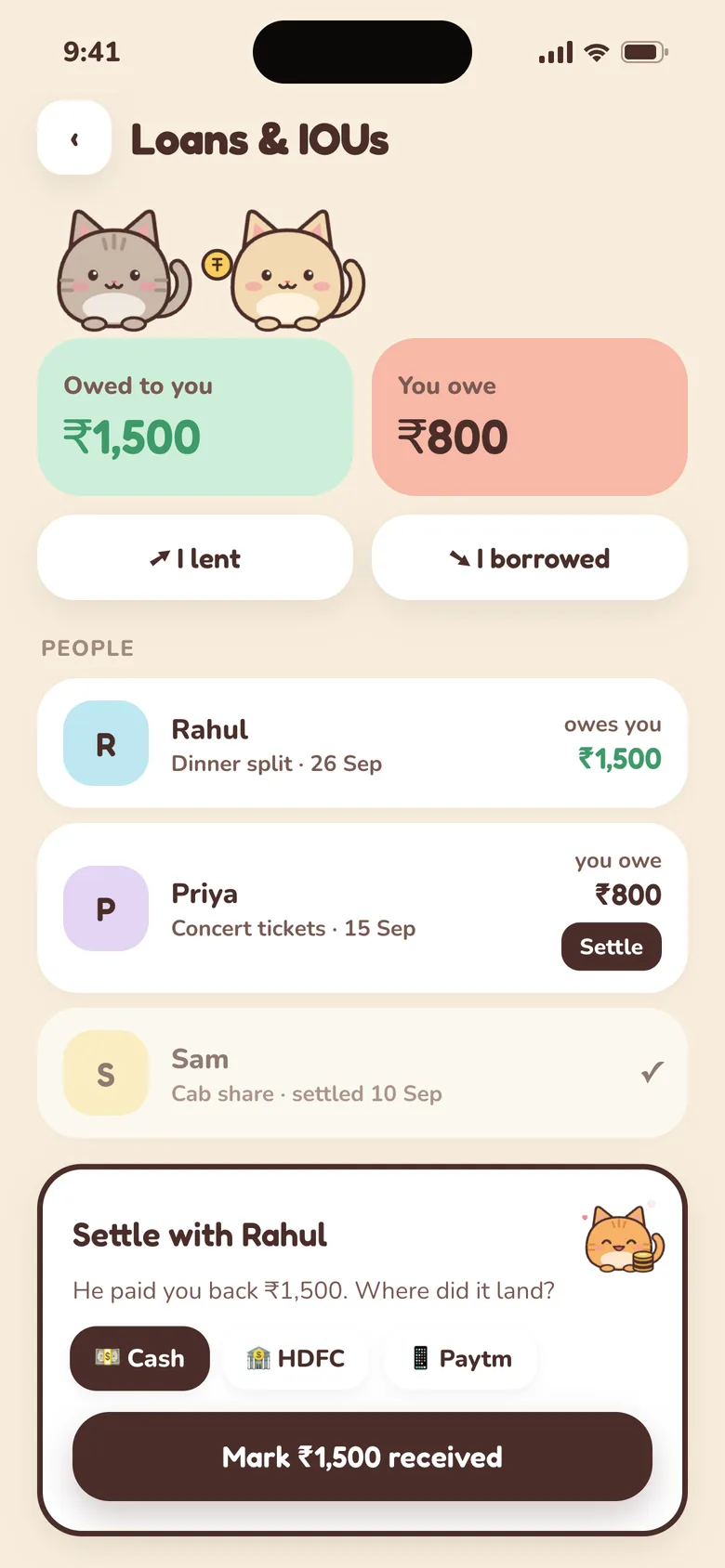
Covered the cab on the trip? Lent ₹500 for concert tickets? Purrse keeps score, then helps you settle up, so nobody has to remember and nothing awkward gets forgotten.
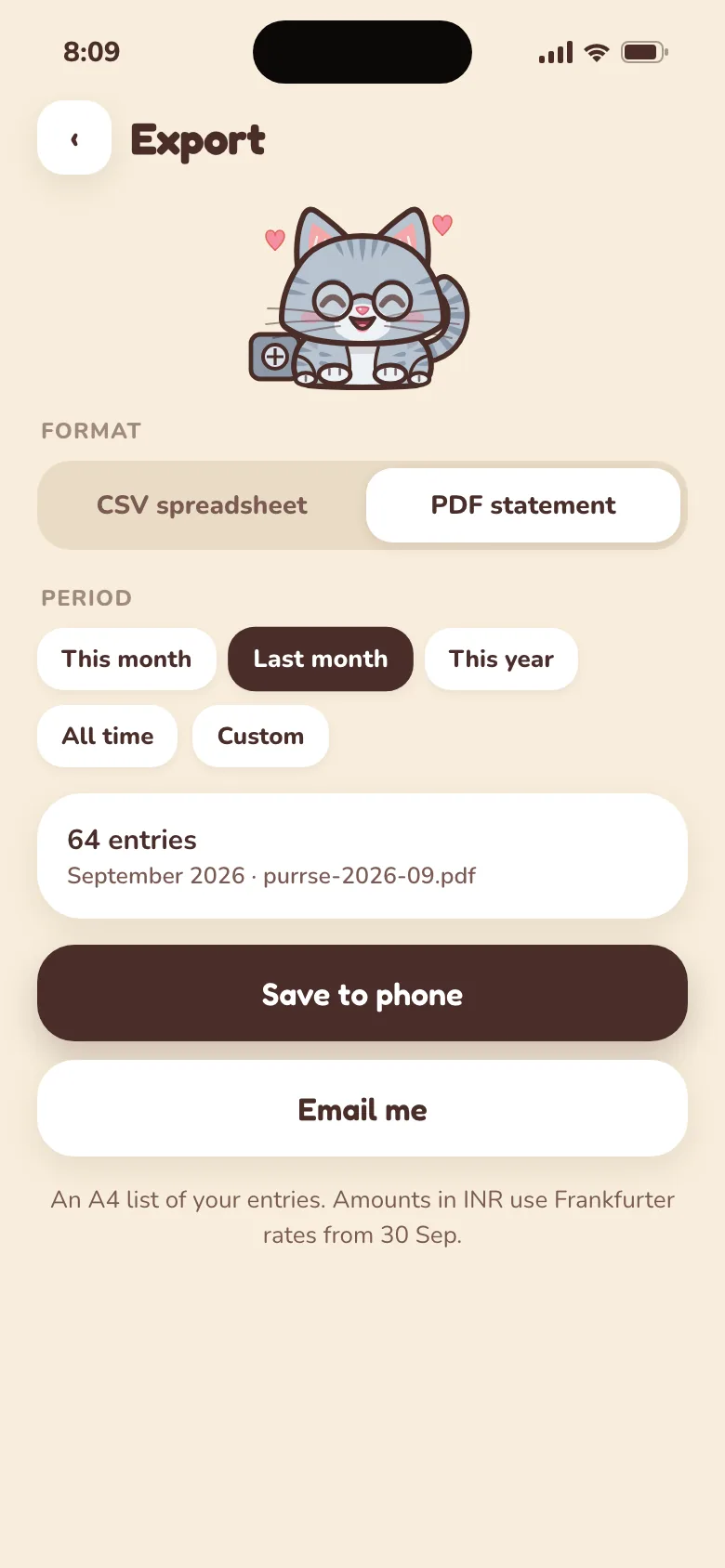
Taxes, a shared flat, your own spreadsheet: export a CSV for Excel, Numbers or Google Sheets, or a PDF statement with your totals. Your last 30 days are free, and older months, years and longer ranges come with Purrse Plus.
Forgot to log that samosa? Pick a time and one of the cats drops by each evening with a friendly nudge. A quiet day takes one tap on Nothing today. It's never the same cat twice in a row, and never a lecture.
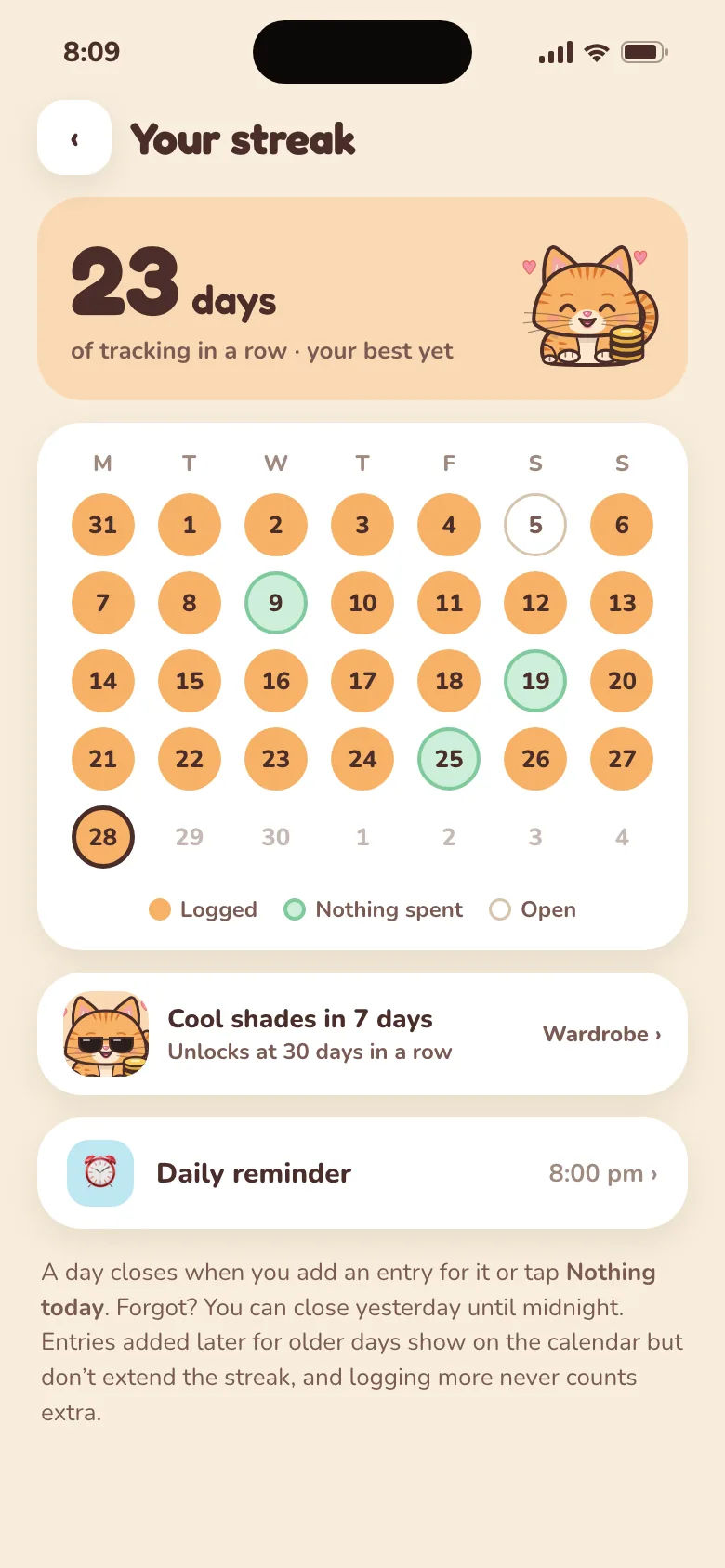
Tracking usually stalls the first time you miss a day. Purrse counts the days in a row you check in, your streak. Log any spend, or tap “Nothing today” on a no-spend day, and the day counts, because Purrse is about tracking, not spending.
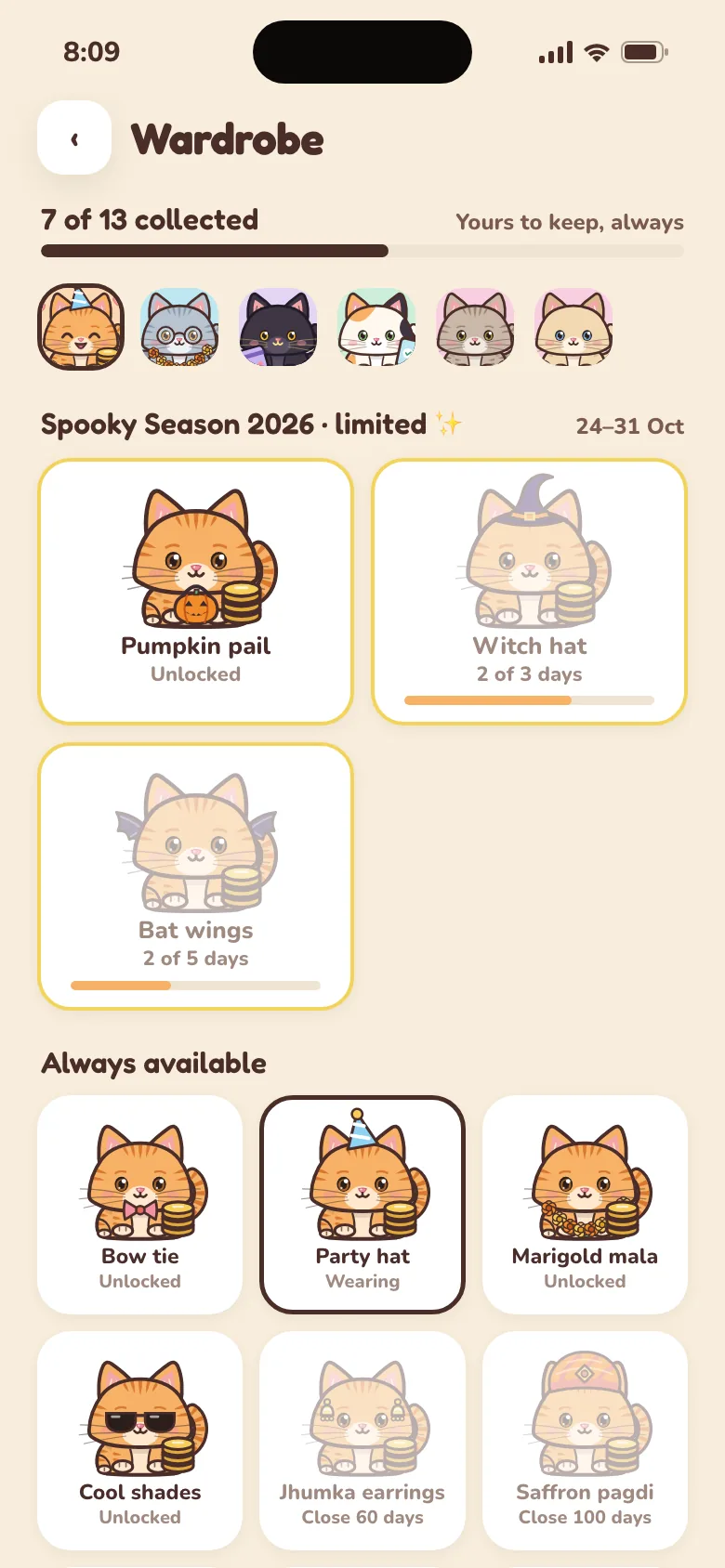
Check in 3, 7, 30 days in a row and more, and you unlock outfits for your cats: a bow tie, party hat, mala, shades, jhumka, pagdi, Nehru jacket and, at 365 days, a Maharaja crown. Each cat wears its outfit everywhere in the app.
Appearance
Pick a look. Tap one to try it.
Make Purrse yours in Me → Appearance. Go dark with Midnight Prowl, crisp with high-contrast Paper, festive with Diya Glow, or moody with Pumpkin Night. The cats keep their own colours in every theme.
Purrse never asks for your bank login and never reads your SMS. You decide what goes in, and only you can see it.
No bank passwords, no SMS reading, no screen scraping. You add entries yourself, in seconds, and you decide what goes in.
On the free plan your data never leaves your phone. With Purrse Plus, every row is locked to your account on the server, and your sign-in is encrypted on your phone.
Purrse opens straight into your money, even with no signal. Everything is saved on your phone first, and with Purrse Plus it syncs when you're back online.
Export your entries as CSV or PDF. With Purrse Plus, delete your account from inside the app and all of your data is removed from our servers.
No ads. No advertising or analytics SDKs. Read the full Privacy Policy.
Purrse sits in between: an accurate record without handing an app your bank data, and without the chore of building a spreadsheet.
| Purrse | SMS or bank-linked apps | Spreadsheets | |
|---|---|---|---|
| Reads your SMS or bank data | Never | Yes, to work | No |
| Logging a spend | Two taps | Automatic, then clean-up | Manual typing |
| Cash, wallets and money lent, in one place | Built in | Varies | If you build it |
| Transfers kept out of spending | Always | Varies | With formulas |
| Works offline | Yes | Varies | Yes |
| Free to start | Yes, no account | Varies | Yes |
| Cats | Five | None | None |
Start free, with every core feature, no account and no card. Add Purrse Plus only when you want cloud backup, your full history and trends. The yearly plan starts with a 7-day free trial.
Free forever, no account
₹0 forever
Cancel anytime
₹199 /month
7-day free trial, then ₹125/mo
₹1,499 /year
Pay once, keep forever
₹4,999 one-time
Plus is bought inside the app. If Plus ever ends, your cloud copy is kept for 30 days, so you can pick up where you left off.
Prices in Indian rupees. The App Store and Google Play show the price in your local currency.
Purrse is a daily expense tracker app for your phone: Android now, iPhone coming soon. You add each spend yourself in a couple of taps, across cash, bank accounts, credit cards, digital wallets and money lent to friends, and see where your money goes each month. A family of cartoon cats keeps each kind of money apart. It works offline and never connects to your bank.
No. Purrse never asks for bank credentials and never reads your SMS or notifications. You log entries yourself, which takes a couple of taps and keeps you in control of what's stored.
Yes. When you log a spend from a bank account you can mark it as UPI, debit card, net banking or cheque, and save your UPI ID on the account. Wallets such as Paytm, Amazon Pay and PhonePe are tracked as separate accounts with their own balance and top-ups.
Yes. The free plan has every core feature: accounts, cards, wallets, IOUs, budgets, recurring bills, streaks, cat reactions, the cat wardrobe, quick add and nudges. No account is needed and your data stays only on your phone. Free shows the last 30 days of entries and this month's stats; older entries stay on your phone and unlock with Plus. Purrse Plus adds sign-in, cloud backup and sync across phones, your full history, past months and 3, 6 and 12-month trends.
Purrse is free to use, with no account needed. Purrse Plus adds cloud backup and sync, your full history, past months and trends. In India, Plus costs ₹199 a month, ₹1,499 a year, or ₹4,999 once for lifetime access. In other countries it costs $3.99 a month, $29.99 a year, or $79.99 once for lifetime access. The yearly plan starts with a 7-day free trial. The App Store and Google Play may show a local price.
Purrse is built around that. Logging takes two taps, and on Android the home-screen widget lets you log without opening the app. Purrse counts the days in a row you check in: log any spend, or tap Nothing today on a no-spend day, and the day counts. Forgot yesterday? You can still fill it in today. An optional evening reminder from a cat has a Nothing today button, so a quiet day takes one tap. Reaching 3, 7, 30 days in a row and more unlocks outfits for your cats. There are no penalties and no scolding.
Many trackers read your bank SMS or need a spreadsheet. Purrse sits in between: manual entry that takes two taps, with cash, bank, cards, wallets and loans in one place. Transfers such as ATM withdrawals and card bill payments are never counted as spending, so your monthly totals stay accurate.
Yes. Each account has its own currency, like travel dollars in your cash wallet. Totals and stats are converted to the base currency you choose. Loans work across currencies too: lend in dollars, get paid back in rupees, and each currency is kept apart so a settled loan stays settled.
Yes. In Me → Budgets, set a monthly limit for any spending category, for all your spending, or both. Stats shows how much is left this month, and a cat speaks up when you reach 80% of a budget and again if you go over. Budgets start fresh on the 1st of every month.
Yes. In Me → Recurring, add a subscription, rent, EMI, SIP or salary with its amount, account and how often it repeats. When one is due, a card on the Record screen lets you log it in one tap or skip it, and with notifications on you get a reminder the day before. Nothing is ever logged without you. Credit cards with a due date get a reminder and a Pay button too.
Yes, with Purrse Plus. On Stats, switch from Month to 3, 6 or 12 months to see your average month, a bar for each month and which categories are rising. Tap any category to see every entry behind it, how this month compares with your usual and its last six months. In Month mode, Mitten also points out what changed, like a habit that’s quietly adding up.
Yes. In Me → Export, pick a format: a CSV that opens in Excel, Numbers or Google Sheets, or a PDF statement with your totals. The free plan exports your last 30 days and saves the file to your phone. Purrse Plus can pick any period and also email the file to the address you signed in with.
On Android, yes. Add the Purrse widget to your home screen, or touch and hold the Purrse icon and tap Add expense. A small card asks for the amount, the account that paid, the category and an optional note, and the entry is waiting in Purrse when you next open it. Back-tap apps that can run app shortcuts, such as Good Lock's RegiStar on Samsung, can open it too.
With Purrse Plus, sign in with the same Google or email account on your new phone and your accounts and entries come back. On the free plan your data lives only on your phone, so take a copy first from Me → Export before you switch. Free exports your last 30 days; older entries move with you only through Plus backup.
Yes. The free plan is fully offline: everything lives on your phone and nothing needs a connection. With Purrse Plus, entries still save on your phone instantly and upload when you're back online.
Yes, if you want it to. Turn on Daily nudge in the Me tab and pick a time. Each evening a different cat sends a friendly reminder with two buttons, Nothing today and Add a spend, so a quiet day takes one tap. It skips days you've already closed, with an entry or a Nothing today. It's off until you switch it on, and the reminders are scheduled on your phone, so nothing about them is sent to our servers.
Yes, a gentle one. A day closes when you log any entry or tap “Nothing today”, so a quiet no-spend day counts too. Forgot yesterday? It stays open and you can close it today. Your streak shows as a chip on Record, with milestones at 3, 7, 14, 30, 60, 100, 200 and 365 days. There are no penalties.
Streak milestones unlock outfits for your cats, such as a bow tie, party hat, mala, shades, jhumka, pagdi, Nehru jacket and, at 365 days, a Maharaja crown. Dress each cat and it wears the outfit everywhere in Purrse. Limited seasonal outfits arrive without an app update and are yours to keep once earned. The wardrobe is free for everyone in Purrse.
Yes. Go to Me → Appearance and pick Midnight Prowl, Diya Glow or Pumpkin Night, or turn on Match my phone to switch between Biscuit and Midnight Prowl with your phone’s light and dark mode. There are eight themes in all, including high-contrast Paper, and all of them are free. With Purrse Plus, your choice also syncs to your other phones.
Subscriptions are billed by Apple or Google. Cancel from your App Store or Google Play subscription settings at least 24 hours before the renewal date. The Lifetime plan never renews.
Plus works until the end of the period you paid for, and a Lifetime plan never ends. After that, sync stops and Purrse goes back to the free plan. We keep your cloud copy for 30 days, so if you subscribe again everything comes back, and after 30 days it is deleted automatically. Your phone keeps all your entries and shows the last 30 days, and Plus unlocks the rest again. Your account stays until you delete it.
In the app, go to Me → Delete account. Your profile, accounts, entries, people and categories are permanently removed from our servers. You can also email us and we'll do it for you.
Free on Google Play: no account, no bank login, no SMS reading. Log tonight's chai in two taps and watch the month add up. The paid upgrade, Purrse Plus, is optional, and you can cancel anytime. On iPhone? Leave your email and a cat will write once, on launch day.